Provide Your MAC Address
Turn your MAG Box upside down and look for the sticker. Write down the MAC Address (it will start with `00:1A:79:...`). You must send this to our support team on WhatsApp so we can whitelist your device on our servers.

How do I set up IPTV on MAG Box? To configure your MAG Box for IPTV, install a professional player app (like IPTV Smarters Pro or TiviMate) either from the official app store or by sideloading it. Once installed, launch the application and choose "Login with Xtream Codes API" to enter your subscription credentials and unlock your live TV and VOD library.
| IPTV Subscription | IPTV MAG Box |
|---|---|
| Requirements | MAC Address binding |
| Compatibility | All Infomir MAG models |
| Setup Time | 4 mins |
| Official Website | Visit Site |
| Device Support | Infomir Support |
MAG set-top boxes by Infomir are dedicated hardware devices specifically built for IPTV. They don't use "apps" or Xtream Codes. Instead, they connect directly to our servers via a Portal URL and are authenticated using the physical MAC Address of the device itself.
Turn your MAG Box upside down and look for the sticker. Write down the MAC Address (it will start with `00:1A:79:...`). You must send this to our support team on WhatsApp so we can whitelist your device on our servers.
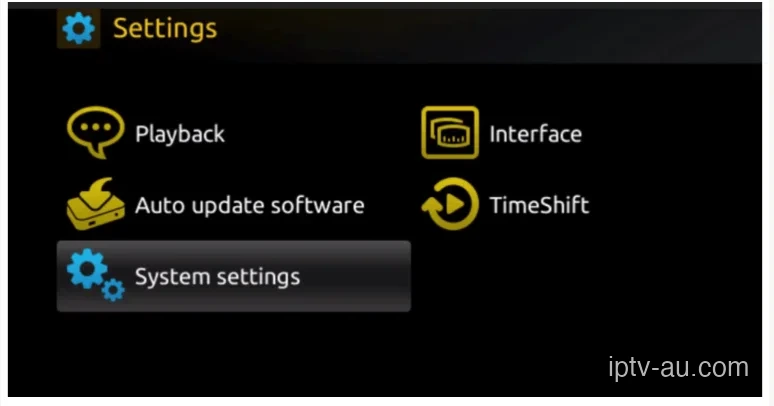
Power on your MAG Box. Once you are on the main interface (Inner Portal), navigate to Settings, and then select System settings.
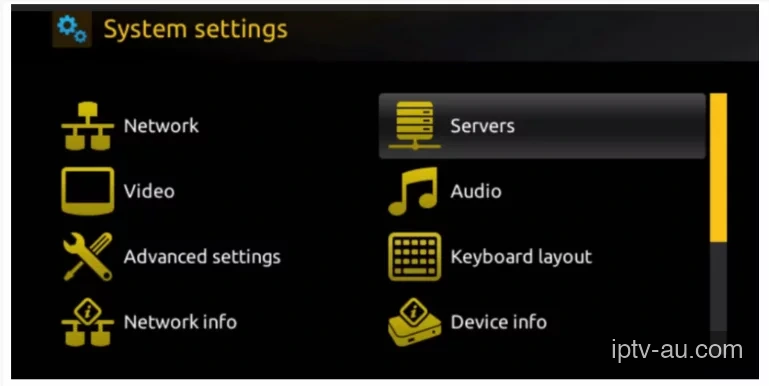
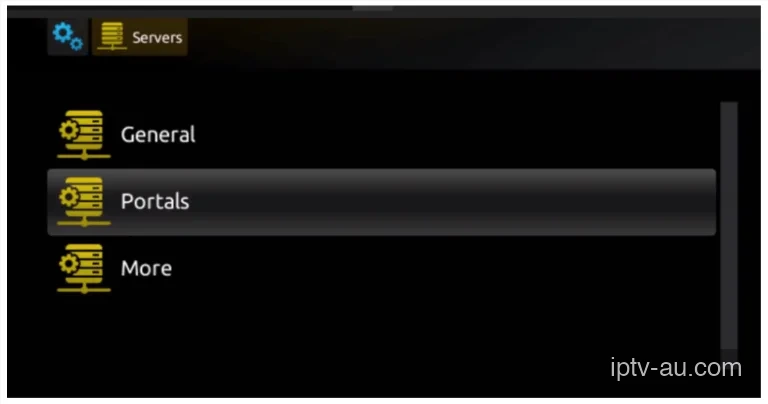
Inside System settings, scroll to the right and select the Servers menu.
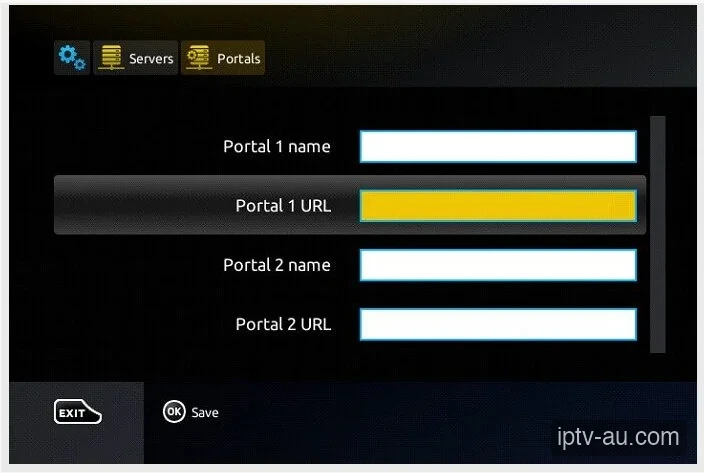
Inside the Servers menu, click on Portals to configure your connection.
In Portal 1 name, type "IPTV
Australia".
In Portal 1 URL, type the exact URL address we sent to your WhatsApp.
Press the
OK button on your remote to save these settings.
Press the EXIT button repeatedly until you reach the main screen. Unplug the MAG box from the wall and plug it back in (Reboot). As long as we have activated your MAC address, the box will load directly into the live TV channels!
This means you typed the Portal URL correctly, but your MAC Address has not been activated on our end yet. Send your MAC address to our WhatsApp support.
Double-check your spelling on the Portal URL. Ensure you included `http://` at the beginning. Restart your MAG box after making any corrections.
This is usually caused by corrupted cache data. Go to your device's Settings > Apps, find the IPTV app, and run a System Cache Clear. If the issue persists, reinstall the application.
Live TV requires a constant, uninterrupted stream of data, while VOD can buffer ahead. Ensure your device is connected via Ethernet. If you must use Wi-Fi, ensure you are on a 5GHz network close to the router.
This indicates a video codec compatibility issue. Go to the app's Player Settings and toggle the decoder between Hardware (HW) and Software (SW). HW decoding is recommended for most modern devices.
Live TV and VOD often stream from different server ports. If Live TV works but VOD doesn't, your ISP might be blocking the VOD port. Restart your router or enable a premium VPN to bypass the block. For a detailed walkthrough, view our Secure VPN Setup Guide for IPTV.
Double-check your credentials. The Xtream Codes API requires exact case-sensitivity. A very common mistake is having an invisible trailing space at the end of your username, password, or server URL.